Oracle
Oracle Database is an enterprise relational database engine. In Gredit, this integration allows connecting to an Oracle instance via ODBC.
What it is used for
Configure an Oracle connection so that scripts can execute SQL queries and read or write data in a relational database.
Configuration
Required data
| Field | Description |
|---|---|
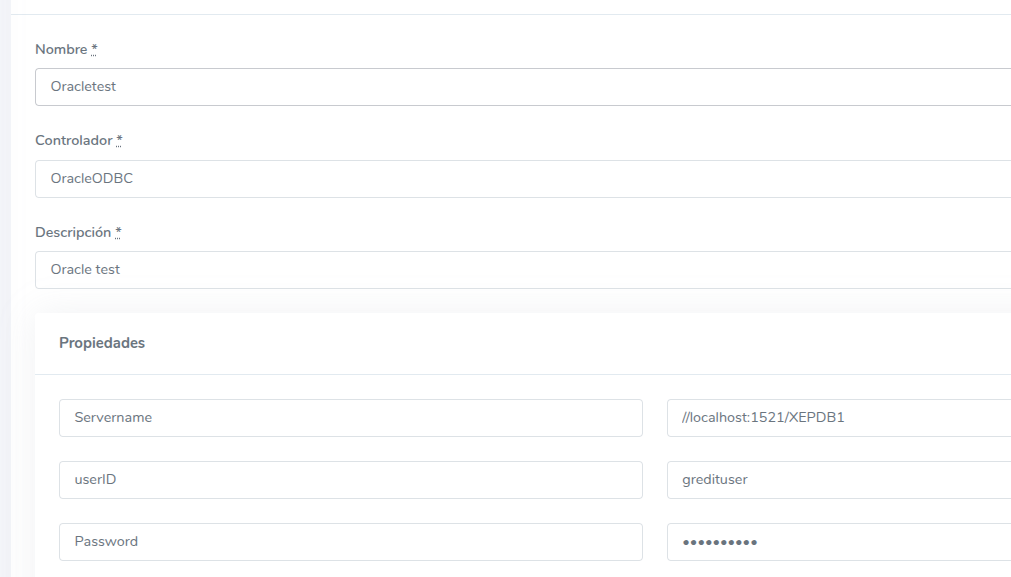
Servername | Connection string in the format /domain:port/database. Example: /example.dominio.com:1521/ex |
userID | Database user |
Password | User password |
Adding the database in Gredit
- Go to the Databases section and create a new configuration.
- Fill in
Servername,userID, andPassword. - In Driver, use
OracleODBC. - The Name value will be the identifier used to inject the connection into scripts.
Usage in scripts
Ruby
require 'json'
require 'odbc_utf8'
require 'ostruct'

client  = ODBC.connect 'OracleTest'
columns = %w(name email)
results = []

query = <<-SQL
  SELECT #{columns.join ','} FROM users;
SQL

stat = client.prepare query

stat.execute

stat.each_hash do |row|
  results << row
end

stat.drop

puts JSON.generate results
Python
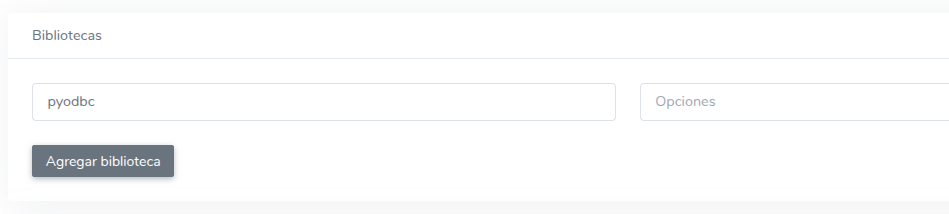
Add the
pyodbclibrary under Libraries in the script settings.
import pyodbc

cnxn = gredit.connect('OracleTest')
cursor = cnxn.cursor()
cursor.execute("SELECT name, email FROM users WHERE ROWNUM <= 10")

columns = [col[0].strip().lower() for col in cursor.description]
rows = cursor.fetchall()

for r in rows:
    h = dict(zip(columns, r))
    print(h["name"], h["email"])

cursor.close()
cnxn.close()
Relationship with other modules
- Accounts: The Oracle connection belongs to an account.
- Scripts: Can be associated with one or more scripts optionally.
- Permissions: Controlled by assigned roles and permissions.