Snowflake
Snowflake is a cloud-based data storage and analytics platform. In Gredit, this integration allows you to connect directly to a Snowflake database to query information through ODBC.
What it is used for
Configure a Snowflake connection so that scripts can run SQL queries and extract information from a cloud database.
Configuration
Required data
| Field | Where to obtain it |
|---|---|
Server | From the URL. Example: https://app.snowflake.com/east-us-2.azure/mpa37119/#/homepage, the value is mpa37119 |
UID | Technical or personal user enabled for the connection |
PWD | Snowflake user credential |
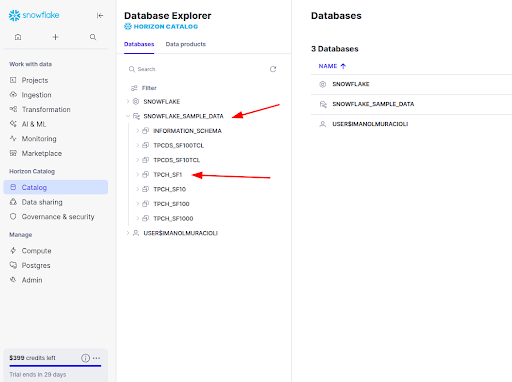
Database | Database catalog in Snowflake |
Schema | Database catalog in Snowflake |
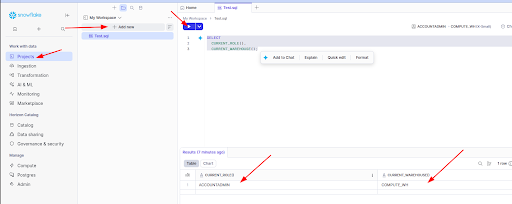
Warehouse | Projects - SQL Query |
Role | Projects - SQL Query |
Get database and schema:
Get role and warehouse:
Click on Projects → + Add new → SQL File. Give it any name and run it with the following content:
SELECT
  CURRENT_ROLE(),
  CURRENT_WAREHOUSE();
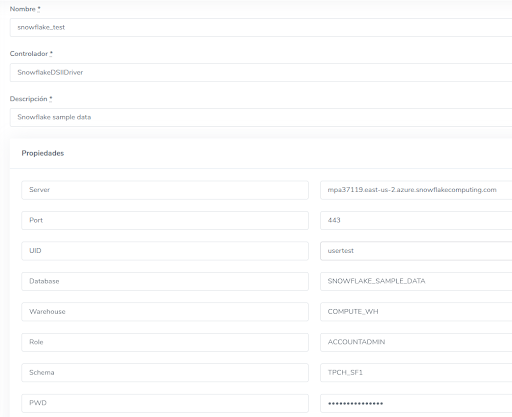
Adding the database in Gredit
- Go to the Databases section and create a new configuration.
- Fill in the data obtained above.
- In Driver, use
SnowflakeDSIIDriver. - The value of Name will be the identifier used to inject the connection into scripts.
Usage in scripts
Ruby
db = ODBC.connect('snowflake_test')

sql = <<~SQL
  SELECT * FROM SNOWFLAKE_SAMPLE_DATA.TPCH_SF1.CUSTOMER LIMIT 5
SQL

stmt = db.run(sql)
columns = stmt.columns.map { |c| c.first }
rows = []

while (row = stmt.fetch)
  row_hash = columns.zip(row.to_a).to_h
  rows << row_hash
end

puts rows.inspect

stmt.drop
db.disconnect
Python
import pyodbc

cnxn = gredit.connect('snowflake_test')

sql = """
SELECT *
FROM SNOWFLAKE_SAMPLE_DATA.TPCH_SF1.CUSTOMER
LIMIT 5
"""

cursor = cnxn.cursor()
cursor.execute(sql)

columns = [col[0] for col in cursor.description]
rows = [dict(zip(columns, row)) for row in cursor.fetchall()]

print(rows)

cursor.close()
cnxn.close()
Relationship with other modules
- Accounts: The Snowflake connection belongs to an account.
- Scripts: It can be associated with one or more scripts optionally.
- Permissions: It is controlled by roles and assigned permissions.