API Integrations
This guide details the steps to configure and use an API integration.
Step 1 – Configure the integration
- Click on Integrations -> New integration.

-
Select the integration type (API)
-
Fill in the fields:
-
Name (Required field)
This is the unique identifier of the integration, which will be used to invoke it from the script. Note: Do not include spaces in the name. Example: github
-
URL (Required field)
Enter the URL that the integration will access. If the URL contains parameters, they must be entered as follows:
-
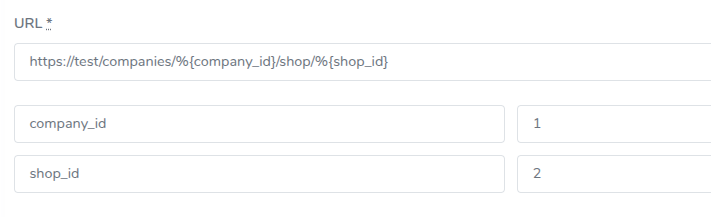
The parameter must be placed within this syntax: %{}.
When you click outside the text area, the parameters will automatically become visible so you can assign them a value.
-
Authentication type (Optional field)
There are four authentication types:
- No authorization: This is the default value; the token input field will not be visible.
- Bearer (Authorization: Bearer <token>): Token entry is required.
- Basic (Base64 of client:secret): You must enter the complete key concatenated without Base64 encoding — Gredit will handle this process. Token entry is required.
- Authorization (header: <token>): Token entry is required.

-
Headers
Allows adding the necessary headers to perform the request.
Clicking the Add header button will reveal two fields, one for the name and one for the value. You can remove a header by clicking the red button on the right.

- Click on Create integration
Step 2 – Using an integration in a script
This section explains how to use a previously created integration. Currently, the API supports the following HTTP methods for making requests to different endpoints: GET, POST, PATCH, and DELETE. From a Ruby or Python script, you can access any integration you have previously configured.
In both languages, an integration is invoked using the following syntax:
@@integration['integration_name']
Important: The name must be exactly the same as the one entered in the Name field when the integration was created.
Ruby
- Request without defining an endpoint or path (request to base URL):
res = @@integration['httpbin']
result = res.get
puts result.body
- Request defining an endpoint or path:
res = @@integration['httpbin']
result = res.get('/users')
puts result.body
- Request sending parameters with an endpoint or path:
Parameters can be set when defining the integration. They must be placed in a hash inside square brackets. In this example: {status: 2, page: 3}
res = @@integration['httpbin'][{status: 2, page: 3}]
result = res.get('/users')
puts result.body
Or they can be specified when making the request. The hash with the parameters must be placed as the second parameter of the get function:
res = @@integration['httpbin']
result = res.post('/post', {status: 2, page: 3})
puts result.body
- Request sending parameters without defining an endpoint or path:
res = @@integration['httpbin']
result = res.get(nil, {page: 1}).body
puts result
Python
- Request without defining an endpoint or path (request to base URL):
res = @@integration['httpbin']
response = res.get()
print(response.text)
- Request defining an endpoint or path:
res = @@integration['httpbin']
response = res.get('/anything')
print(response.text)
- Request sending parameters with an endpoint or path:
Parameters can be set when defining the integration. They must be placed in a hash inside square brackets. In this example: {'status': 2, 'page': 3}
res = @@integration['httpbin'][{'status': 2, 'page': 3}]
response = res.get('/anything')
print(response.text)
Or they can be specified when making the request. The hash with the parameters must be placed as the second parameter of the get function:
res = @@integration['httpbin']
response = res.post('/post', {'status': 2, 'page': 3})
print(response.text)
- Request sending parameters without defining an endpoint or path:
res = @@integration['httpbin']
response = res.post(None, {'status': 2, 'page': 3})
print(response.text)