AWS Integrations
This guide details the steps to configure and use an AWS integration.
Step 1 – Configure the integration
- Click on Integrations -> New integration.
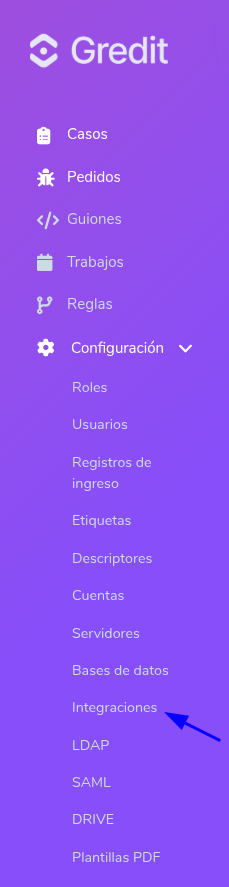
-
Select the integration type (AWS)
-
Enter the name:
This is the name that will identify the integration, so it should be clear and in slug format (hyphens instead of spaces, no accents).
-
Select the service type (S3 or Athena)
-
Fill in the fields
S3:
- Region: Indicates the AWS region where the Amazon S3 bucket was created. Example:
us-east-1,sa-east-1. - Access key: Corresponds to the AWS Access Key ID.
- Secret key: Corresponds to the AWS Secret Access Key.
- Bucket: Name of the Amazon S3 bucket from which files will be read. Example:
bucket-exampleImportant: Do not enter thes3://prefix
Athena:
- Name: This is the name that will identify the integration, so it should be clear and in slug format (hyphens instead of spaces, no accents).
- Region: Indicates the AWS region where the Amazon S3 bucket was created. Example:
us-east-1,sa-east-1. - Access key: Corresponds to the AWS Access Key ID.
- Secret key: Corresponds to the AWS Secret Access Key.
- S3 output: Location where the query result data will be stored. Example:
bucket-example/athena-resultsImportant: Do not enter thes3://prefix
- Region: Indicates the AWS region where the Amazon S3 bucket was created. Example:
-
Click Save
Step 2 – Using an AWS integration in a script
This section explains how to use a previously created integration. From a Ruby or Python script, you can access any integration you have previously configured.
In both languages, an integration is invoked using the following syntax:
@@integration['integration_name']
Important: The name must be exactly the same as the one entered in the Name field when the integration was created.
Ruby
- S3:
result = @@integration['gredit-demo-s3']
puts result.download_from_s3('/data/users.csv')
The name 'gredit-demo-s3' must exactly match the name used when the integration was created.
The parameter, in this case '/data/users.csv', is the key or path of the document stored in the bucket specified when you created the configuration.
If you want to use a different bucket with the same credentials, you can specify it like this:
res = @@integration['gredit-demo-s3']
puts res.download_from_s3('/data/users.csv', bucket: 'other-bucket-name')
Uploading files to S3:
res = @@integration['gredit-demo-s3']
res.upload_to_s3('/data/output.csv', content)
The first parameter is the destination key or path within the bucket. The second parameter is the content to upload. If you want to specify the content type, you can do it like this:
res = @@integration['gredit-demo-s3']
res.upload_to_s3('/data/output.csv', content, content_type: 'text/csv')
If you want to upload to a different bucket using the same credentials, you can specify it like this:
res = @@integration['gredit-demo-s3']
res.upload_to_s3('/data/output.csv', content, bucket: 'other-bucket-name')
- Athena:
res = @@integration["athena-demo"]

rows = res.run_athena_query(
  "SELECT * FROM users LIMIT 5",
  database: "gredit_demo"
)

puts rows
The name 'athena-demo' must exactly match the name used when the integration was created.
The first parameter of the run_athena_query function is the query to be executed. Example: "SELECT * FROM users LIMIT 5"
The second parameter is the database to be queried. Example: "gredit_demo"
If you want to use a different output location from the one specified in the integration, you can indicate it like this:
res = @@integration["athena-demo"]
rows = res.run_athena_query(
  "SELECT * FROM users LIMIT 5",
  database: "gredit_demo",
  output_location: "other-path"
)
puts rows
Python
- S3:
res = @@integration['gredit-demo-s3']
print(res.download_from_s3('/data/users.csv'))
The name 'gredit-demo-s3' must exactly match the name used when the integration was created.
The parameter, in this case '/data/users.csv', is the key or path of the document stored in the bucket specified when you created the configuration.
If you want to use a different bucket with the same credentials, you can specify it like this:
res = @@integration['gredit-demo-s3']
print(res.download_from_s3('/data/users.csv', bucket= 'other-bucket-name'))
Uploading files to S3:
res = @@integration['gredit-demo-s3']
res.upload_to_s3('/data/output.csv', content)
The first parameter is the destination key or path within the bucket. The second parameter is the content to upload. If you want to specify the content type, you can do it like this:
res = @@integration['gredit-demo-s3']
res.upload_to_s3('/data/output.csv', content, content_type='text/csv')
If you want to upload to a different bucket using the same credentials, you can specify it like this:
res = @@integration['gredit-demo-s3']
res.upload_to_s3('/data/output.csv', content, bucket='other-bucket-name')
- Athena:
res = @@integration["athena-demo"]
rows = res.run_athena_query(
    "SELECT * FROM users LIMIT 5",
    database="gredit_demo"
)
print(rows)
The name 'athena-demo' must exactly match the name used when the integration was created.
The first parameter of the run_athena_query function is the query to be executed. Example: "SELECT * FROM users LIMIT 5"
The second parameter is the database to be queried. Example: "gredit_demo".
If you want to use a different output location from the one specified in the integration, you can indicate it like this:
res = @@integration["athena-demo"]

rows = res.run_athena_query(
    "SELECT * FROM users LIMIT 5",
    database="gredit_demo",
    output_location="other-path"
)

print(rows)